
A campaign naming convention is a fixed set of fields, joined by a consistent delimiter, that turns a campaign’s metadata into a parseable string. Copy this starter: {year_month}_{objective}_{funnel}_{audience}_{offer}_{id} — for example, 2026-03_leadgen_mof_returning_spring-sale_v2. The rule underneath it never changes: fixed fields, closed vocabularies, one delimiter, every time.
TL;DR:
- Ensuring closed vocabularies and consistent formatting in a fixed field set prevents naming chaos and supports accurate, automated cross-platform reporting.
- Mapping stable metadata to specific account levels—campaign, ad set, and ad—maintains clarity and reduces errors in campaign identification and performance tracking.
- Always match utm_campaign precisely to the campaign name, generated via URL builders, to avoid reconciliation issues and duplicate data in analytics.
- Automating compliance checks weekly on naming conventions catches drift early, preventing long-term data quality issues across large campaign portfolios.
- Using simple, proven templates tailored to team size and platform can streamline reporting, with the smallest effective set of fields being preferable to overly complex schemas.
Table of Contents
- Quick Takeaways for Campaign Naming Conventions
- What Are Naming Conventions, and Why Does Taxonomy Come First?
- Why Standardized Naming Matters for AI-Ready Reporting
- What Fields Belong in a Campaign Name?
- How Do You Map Fields Across Campaign, Ad Set, and Ad Levels?
- Copy-Paste Templates for Every Team Size
- Delimiter Choice and Date Formatting Rules
- Why Should utm_campaign Match Your Campaign Name Exactly?
- How Do You Roll Out and Enforce a Naming Convention?
- Your Campaign Naming Checklist and Validator Outline
- How Senior PPC Teams Actually Use Naming Conventions
- Common Mistakes That Break Campaign Naming Conventions
- How Do You Update a Naming Convention Without Breaking Historical Data?
- Naming Conventions Across Search, Social, and Programmatic Channels
- What Actually Works vs. What Sounds Good on a Whiteboard
- How North Country Consulting Approaches Naming and Account Structure
- Where to Go for Naming Templates and UTM Tools
- Sources
Quick Takeaways for Campaign Naming Conventions
Before you build anything, get these five moves right. They cover most of what breaks naming systems in the first six months.
- Start with taxonomy, not names. Decide what business questions you need to answer before you write a single field.
- Write down closed vocabularies. Every field that isn’t a date or ID should pull from an approved list, not free text.
- Use one delimiter and ISO dates. Pick underscore or pipe, then format dates as YYYY-MM so they sort correctly as text.
- Make utm_campaign match the campaign name exactly. No exceptions, no “cleaned up” versions.
- Assign an owner and automate the audit. Someone’s job title should include naming governance, and a script should check compliance weekly.
Skip any one of these and the convention degrades within a quarter. Skip all five and you’re back to manually reconciling spreadsheets by Q3.
What Are Naming Conventions, and Why Does Taxonomy Come First?
A taxonomy is the list of business questions you need your data to answer: which funnel stage performed best, which product line is cannibalizing another, which audience segment drives the highest margin. A naming convention is the formatting layer that takes those answers and encodes them into every campaign, ad set, and ad name across your accounts.
Most teams build this backward. They pick a naming format because it looks clean, then discover six months later it can’t answer “how did retargeting perform versus prospecting by product line last quarter” because retargeting status was never a field. Teams should define the taxonomy first, then build formatting rules that carry that taxonomy into the name.
Once fields are consistent, names stop being labels and start functioning as metadata. A dashboard can split a campaign name on its delimiter and populate columns automatically. A data lake can ingest thousands of campaigns without a human tagging each one. An AI agent optimizing bids across platforms can read “mof” and “prospecting” the same way every time.
The alternative is expensive in a boring way. One inconsistent field, say “Q1” in some campaigns and “Jan-Mar” in others, forces someone to manually clean and reclassify data before any report can run. Multiply that across a few thousand campaigns and naming chaos becomes a part-time job nobody signed up for.
Why Standardized Naming Matters for AI-Ready Reporting
Poor data quality is one of the biggest blockers cited for analytics and AI readiness at the account level, and campaign names are often the first place that shows up. When names follow a fixed structure, a report writer or automated script can trust that “funnel stage” always lives in position three and always contains one of four approved values. That trust is what lets time-to-insight drop from days to minutes.
The bigger payoff shows up in automation. A consistent naming convention lets you run cross-platform analysis without manually reclassifying every campaign that flows into a BI tool or an AI agent. Feed Google Ads, Meta, and Microsoft Advertising data into the same pipeline, and if all three used the same field order and vocabulary, you get one clean join. Inconsistent naming means a human has to sit in the middle, mapping “brand” in one platform to “branded” in another before any blended ROAS number means anything.
This is where naming stops being a formatting preference and becomes a governance decision. Every hour spent reconciling names by hand is an hour not spent acting on what the data says. Teams managing spend across several platforms feel this fastest, because structured data feeding automated systems compounds in value the more channels you add. A naming convention isn’t overhead sitting next to your reporting stack. It’s the layer that decides whether that stack works at all.
What Fields Belong in a Campaign Name?
A working campaign name needs a moderate number of components to include necessary metadata while remaining readable and manageable. A recommended field set looks like this:
- Year/Month (YYYY-MM): anchors the campaign in time and sorts correctly as text.
- Objective/campaign type: leadgen, sales, awareness, retargeting. Pick from a closed list, not a sentence.
- Funnel stage: tof, mof, bof. Three values, never more, unless your funnel genuinely has a fourth stage.
- Audience/segment: new, returning, lookalike, cart-abandon. Again, closed vocabulary.
- Product or offer: the specific SKU line, service, or promotion the campaign supports.
- Unique identifier: a short code or sequence number that guarantees no two campaigns share an identical string.
What you leave out matters as much as what you include. Never put mutable values into a name: budget tiers, bid strategies, or audience size all change over the campaign’s life, and a name that says “high-budget” becomes a lie the day someone cuts spend. Those values belong in your ad platform’s own fields or in a linked spreadsheet, not baked into a string you’ll have to rename later.
For free-text fields where a closed vocabulary genuinely doesn’t fit (a specific offer name, for instance), lowercase everything and hyphenate multi-word values: spring-sale, not Spring Sale or springSale. Consistency in casing matters more than which casing style you pick, because mixed casing breaks exact-match filtering in most reporting tools.
The smallest set of fields that answers your actual business questions beats a “complete” template nobody follows. Add a field only once you’ve confirmed it gets used in a real report.
How Do You Map Fields Across Campaign, Ad Set, and Ad Levels?
Naming breaks down fastest when teams try to cram every piece of metadata into the campaign name alone. The fix is a hierarchy: each level of your account structure carries the fields that are stable at that level, and nothing more.
Campaign level holds the metadata that doesn’t change once the campaign launches: product line, objective, launch date, and funnel stage. This is the business-level identity of the campaign, and it should stay fixed for the campaign’s lifetime.
Ad set or ad group level carries targeting logic: the audience segment, the keyword theme for search, or the interest cluster for social. This is where “who are we trying to reach” lives, separate from “what are we trying to accomplish,” which stays at the campaign level.
Ad level carries the creative variable: concept, format, and version. Version numbers should always increment (v1, v2, v3) and never get reused, even after an ad gets paused and replaced. Reusing “v2” for a completely different creative six months later destroys your ability to trace performance history.
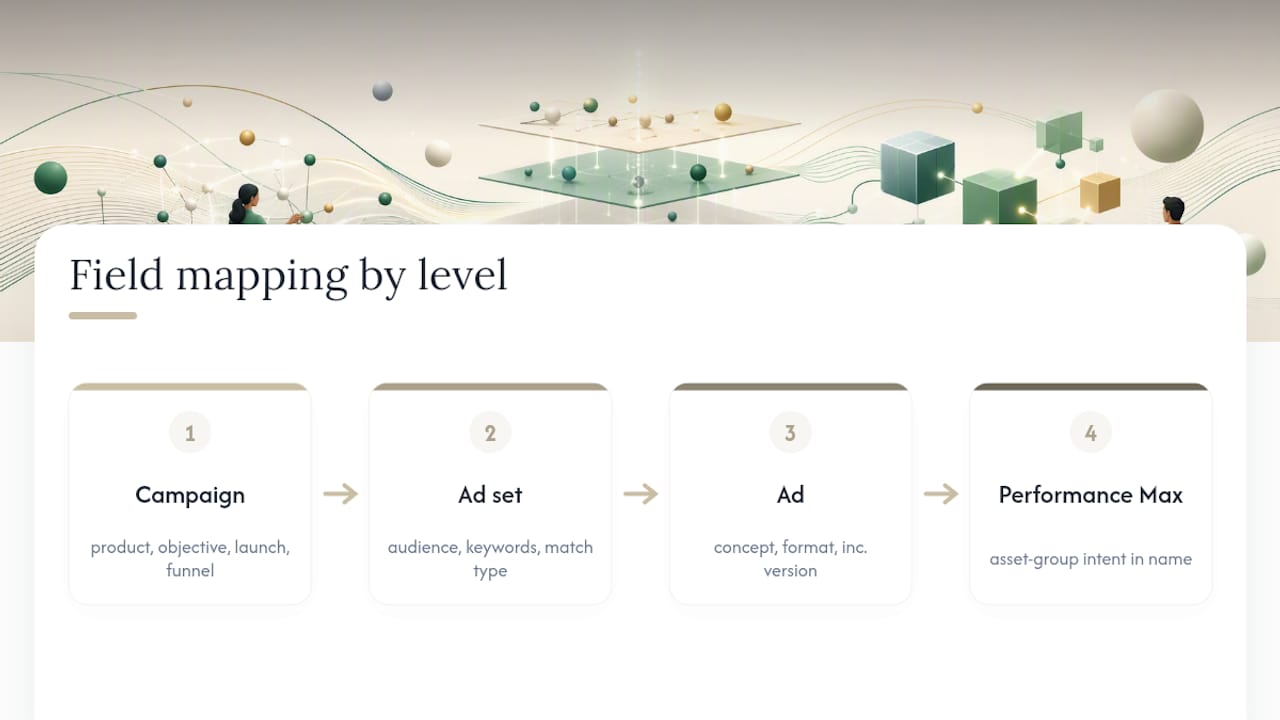
Platform quirks change this slightly. Search campaigns need match type encoded at the ad-group level since it drives such different behavior. Performance Max has no ad-group layer at all, so asset-group intent needs to be encoded directly in the asset group name, using the closest equivalent to your funnel-stage or audience fields. Meta’s dynamic creative and Advantage+ campaigns need concept pools named clearly enough that you can tell which creative elements are being tested against each other, since Meta’s algorithm handles the actual combination.
Copy-Paste Templates for Every Team Size
Smaller teams running a handful of campaigns don’t need the same field count as an agency managing forty accounts. Here are two starting points, plus level-specific examples.
Compact template (small teams, one to three platforms):
{year_month}_{objective}_{funnel}_{audience}
Example: 2026-04_sales_bof_returning
Full template (larger ops, multi-platform reporting):
{year_month}_{platform}_{objective}_{funnel}_{audience}_{offer}_{id}
Example: 2026-04_google_sales_bof_returning_spring-sale_047
Ad set/ad group naming (nests under the campaign):
{audience}_{targeting-theme}_{match-type}
Example: returning_broad-shoppers_bm (bm = broad match)
Ad naming (nests under the ad set):
{concept}_{format}_{version}
Example: testimonial_video-15s_v3
A few platform notes worth pinning above your desk. Google Ads truncates campaign names in some reporting views around 128 characters, so keep the compact template as your default and reserve the full template for accounts where every field earns its place. Meta’s naming has more display room but breaks down fast in Ads Manager’s bulk-edit views if names run long. Performance Max templates should swap the audience field for an asset-group theme, since there’s no traditional targeting layer to name. Match-type and asset-group substitutions are the two most common platform-specific tweaks teams need to make to an otherwise standard template.
Delimiter Choice and Date Formatting Rules
Underscores work best as your primary delimiter because they survive URL encoding, CSV exports, and most platform search filters without breaking. Pipes look cleaner to a human reading a list of campaigns, but they can cause parsing issues in certain export tools and should only replace underscores when you’ve confirmed your full reporting stack handles them cleanly.
Inside a field, use hyphens to separate words: spring-sale, not spring_sale, which would get confused with your field delimiter. Pick one casing standard, lowercase is easiest to enforce, and never mix it with CamelCase in the same account.
Dates should always follow ISO format, YYYY-MM. This isn’t a stylistic preference. Text-based sorting in spreadsheets and reporting tools only works correctly when dates are formatted this way; “March 2026” or “3-26” will sort alphabetically instead of chronologically, scrambling your timeline the moment you have more than twelve campaigns.
As a practical ceiling, keep full campaign names under roughly 100 characters. Very long names become unreadable in bulk-edit views and increase the odds of a typo breaking your closed vocabulary.
Why Should utm_campaign Match Your Campaign Name Exactly?
The rule is simple and almost nobody follows it consistently: utm_campaign should be the exact campaign name, character for character. Not a shortened version, not a “cleaned up” version for readability, the same string.
The reason is mechanical. If utm_campaign diverges from the campaign name, you now have two systems of record instead of one, and every report that joins ad-platform data to web analytics has to reconcile the mismatch by hand. That reconciliation work never goes away on its own. It compounds every time someone launches a new campaign with a slightly different UTM habit.
The fix is to derive UTMs mechanically from the name rather than typing them separately. Use Google’s Campaign URL Builder to generate the tagged URL, pasting your campaign name directly into the utm_campaign field so there’s no room for a typo or a “quick fix” to sneak in. If you’re running auto-tagging alongside manual UTMs, check how the two interact before launch. UTM fragmentation between auto-tagged and manual parameters is one of the most common ways teams end up with duplicate campaign rows in their analytics platform.
How Do You Roll Out and Enforce a Naming Convention?
Start with a workshop, not a memo. Get everyone who launches campaigns in a room, agree on the taxonomy and the field list, and publish the result as a data dictionary that lives somewhere everyone can search, not a slide deck nobody opens again.
Enforcement is where most conventions actually fail. Documentation without automation is a suggestion, not a rule. Run a weekly export of all live campaign names and a script that checks four things: does the name have the expected number of fields, does each closed-vocabulary field contain an approved value, does the date field match YYYY-MM, and is the total length within your platform’s limit. Flag violations to the campaign owner, not to a general channel nobody’s accountable for.
Migration is the part everyone dreads. Renaming a thousand live campaigns to match a new convention risks resetting performance history in some platforms and creates weeks of cleanup. The lower-risk path is adding a canonical campaign-code field, a short internal ID, that maps old names to the new taxonomy without touching the live campaign itself. New campaigns launch under the new convention; old ones get mapped, not renamed, unless a platform migration forces your hand anyway.
Your Campaign Naming Checklist and Validator Outline
Print this and hand it to whoever launches campaigns.
- Confirm the taxonomy answers your team’s actual reporting questions before naming anything.
- Check every field against the published closed vocabulary, no free text unless the field is explicitly marked open.
- Verify the date field reads YYYY-MM.
- Confirm utm_campaign matches the campaign name exactly, generated through the URL builder, not typed separately.
- Check total character length against the platform’s practical limit.
- Get a second reviewer to approve before launch, especially in the first month of a new convention.
Default field order for most teams: {year_month}_{objective}_{funnel}_{audience}_{offer}_{id}
A basic validator needs four steps: split the name on its delimiter, assert the resulting field count matches your template, assert each closed-vocabulary field’s value appears in the approved list, and assert the date field parses as YYYY-MM. Weekly automated checks that run these four assertions catch drift before it spreads across an account.
Pro Tip: Run your validator script every Monday morning before the week’s new campaigns launch, not just at quarter-end. Catching one bad campaign name early costs five minutes; catching forty of them in a Q4 audit costs an afternoon.
How Senior PPC Teams Actually Use Naming Conventions
North Country Consulting works with accounts that have significant monthly Google Ads spends, and account structure, including naming, is one of the first things reviewed on any engagement. Loose naming is rarely the root cause of poor return on ad spend, but it’s almost always a symptom of the same account hygiene issues that are: undocumented campaign changes, no clear ownership, and reporting built on assumptions nobody’s tested.
The free strategy audit North Country Consulting offers looks specifically at whether campaign structure and naming support reliable attribution, or whether they’re quietly working against it. A campaign name that can’t tell you funnel stage or audience segment at a glance usually means the account can’t answer basic performance questions without manual digging, and that digging is time a senior strategist should be spending on optimization instead.
Naming discipline alone won’t fix a poorly structured account. But an account that can’t name its own campaigns consistently is rarely tracking anything else consistently either.
Common Mistakes That Break Campaign Naming Conventions
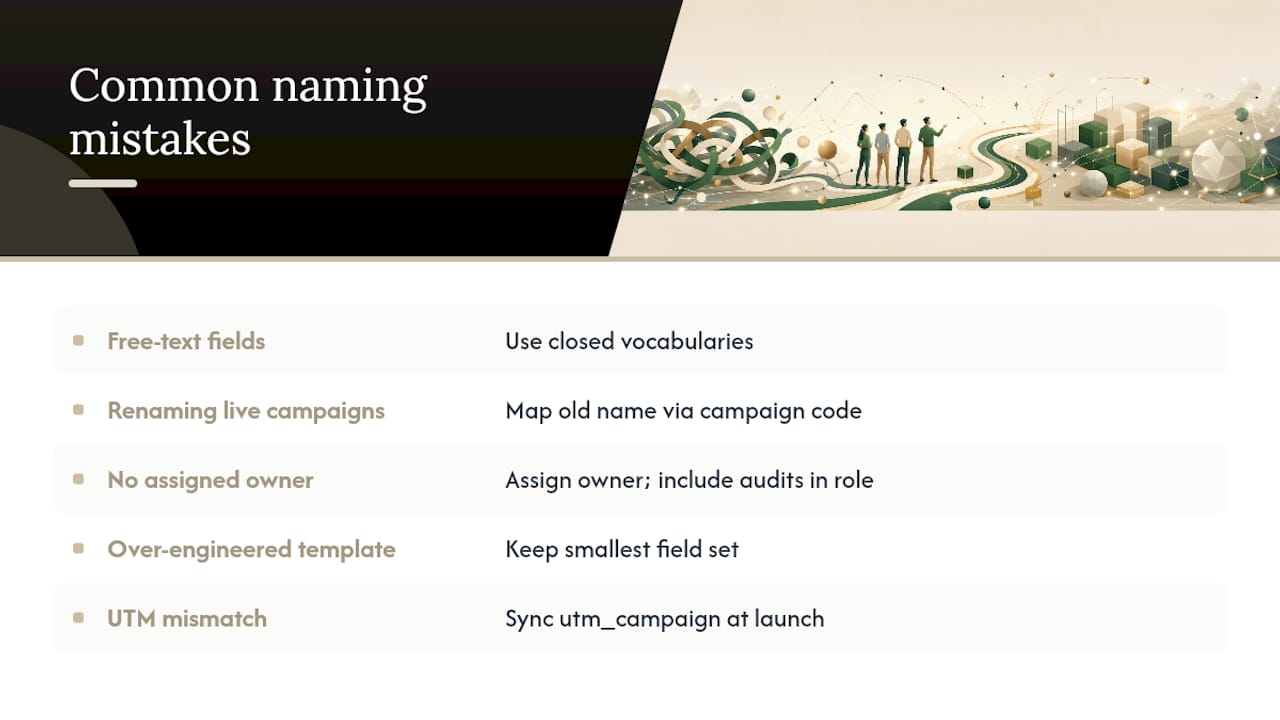
The single most common failure point is a documented convention with free-text fields instead of closed vocabularies. Teams write a beautiful naming guide, then let anyone type whatever they want into the audience or objective field. Within a month you get “Returning,” “returning-customers,” and “RTN” all meaning the same thing, and every report has to account for all three.
Renaming live campaigns is the second big mistake. It feels harmless, “let’s just fix this one campaign’s name,” but on several platforms it resets learning phases or breaks historical performance continuity. If a name is wrong, fix it going forward and map the old name to the new taxonomy through a campaign code, rather than editing a live campaign string.
No assigned owner is the third failure mode, and it’s the quietest one. A convention with no one responsible for enforcing it decays the moment its original author changes roles or leaves. Automated weekly audits catch this early, but only if someone’s job actually includes reading the audit output.
A fourth mistake worth naming directly: over-engineering the template. Teams add a field for every conceivable future use case, ending up with eight or nine components and a name nobody can read at a glance. The smallest field set that answers your real reporting questions beats a comprehensive one that gets abbreviated inconsistently because it’s too long to type correctly every time.
Last, teams often skip synchronizing utm_campaign with the campaign name at launch, planning to “clean it up later.” Later rarely comes, and the mismatch compounds with every new campaign launched under the old habit.
How Do You Update a Naming Convention Without Breaking Historical Data?
Conventions need to evolve. A field set that worked for ten campaigns a month often breaks down once you’re running fifty across three platforms, and locking a convention in permanently just delays the pain.
The safest update path treats old and new conventions as parallel systems, not a single migration event. New campaigns launch under the revised template immediately. Existing live campaigns keep their current names, but get tagged with a canonical campaign-code field, a short internal reference ID, that lets your reporting layer map old naming to the new taxonomy without editing a single live campaign string.
Version your convention itself. Keep a one-line changelog in your data dictionary: “v2, added platform field, March 2026” is enough to tell anyone reviewing an old report which template era a given campaign belongs to. Without that, six months from now nobody will remember why some campaigns have five fields and others have six.
Review the convention on a fixed schedule rather than reactively. A quarterly fifteen-minute check, are the closed vocabularies still complete, has a new campaign type appeared that doesn’t fit any existing field, is usually enough to catch drift before it requires a bigger fix. Waiting until reporting breaks to revisit naming means you’re fixing a governance problem under deadline pressure instead of on your own schedule.
Retiring a field is riskier than adding one. If you drop a field that historical reports depend on, either keep it as an optional trailing component for a transition period or build the mapping into your data dictionary so old reports still resolve correctly.
Naming Conventions Across Search, Social, and Programmatic Channels
The core taxonomy stays the same across channels: objective, funnel stage, audience, and date. What changes is which field actually carries the most useful signal for that platform’s optimization logic.
Search (Google Ads, Microsoft Advertising): keyword theme and match type matter enough to live at the ad-group level, since they drive fundamentally different auction behavior. A typical ad-group name might read broad-shoppers_bm nested under a campaign like 2026-04_google_sales_bof.
Performance Max: with no ad-group layer, asset-group names need to carry the closest available signal to audience or theme. Something like asset-prospecting_shoes communicates intent even though Performance Max structures campaigns differently than standard search or display campaigns.
Meta (Facebook and Instagram Ads): with Advantage+ and dynamic creative doing much of the audience-matching automatically, naming should focus on concept pools at the ad level, since that’s where a human still makes creative decisions the algorithm can’t. Something like ugc-testimonial_static_v2 tells you exactly what’s being tested.
Programmatic and display networks: these often support fewer campaign-level fields than search or social platforms, so prioritize funnel stage and product line over audience granularity, since programmatic audience targeting frequently happens at the platform’s DSP level rather than in campaign naming.
Email and organic social rarely need the full paid-media template, but keeping the same date format and campaign-code field lets cross-channel attribution reports treat every channel’s activity consistently, even when the field list is shorter.
What Actually Works vs. What Sounds Good on a Whiteboard
The naming conventions that survive contact with a real marketing team are almost never the most complete ones. They’re the smallest set of fields a team will actually type correctly, every single time, for a year straight.
Three mistakes account for most of the naming failures I’ve seen documented across agency and in-house teams alike. First, no owner: a convention with no one accountable for it decays the moment the person who built it moves to a different project. Second, free text disguised as structure: a beautiful field list where the actual values typed into each field are whatever the campaign manager felt like that day. Third, renaming live campaigns mid-flight, which trades a cosmetic fix for real damage to learning phases and historical continuity.
The habit that prevents most of this costs about ten minutes a week: run the validator, read the flagged rows, fix them before Friday. Teams that treat this as a standing calendar event rarely end up with a naming mess large enough to need a cleanup project. Teams that treat it as “something we’ll get to” always do.
There’s also a point where simplicity beats completeness outright. If you’re running fifteen campaigns across one platform, you don’t need a six-field template with a unique-identifier suffix. You need four fields you’ll remember without checking the data dictionary. Add complexity only when a specific reporting question forces your hand, never because a template online has more fields than yours.
— Eric
How North Country Consulting Approaches Naming and Account Structure
If your naming convention has quietly fallen apart, and most do once an account crosses a few hundred campaigns, that’s usually a symptom of a bigger structural problem, not the root cause. The approach is built around senior-led account management rather than the junior-analyst model most agencies run on, which means the person rebuilding your account structure has experienced doing it before at scale.
The free strategy audit reviews campaign naming, account structure, and attribution setup together, because those three things break down for the same underlying reasons. If your utm_campaign values don’t match your campaign names, or your funnel-stage fields have turned into free text over the past year, that audit will surface exactly where the reconciliation gaps are costing you reporting accuracy. For accounts spending significant amounts a month on Google Ads, that kind of structural review often finds more recoverable ROAS than another round of bid adjustments ever will.
Book the audit through North Country Consulting’s services page and get a direct look at what’s actually happening inside your account structure, naming included.
Where to Go for Naming Templates and UTM Tools
A few resources are worth bookmarking alongside your own data dictionary. Google’s Campaign URL Builder is the fastest way to generate and check UTM parameters against your campaign names. The taxonomy-first naming guide walks through building a data dictionary from scratch. For account-structure fundamentals that naming has to map onto, Google Ads account structure best practices covers the layer your fields need to respect.
Sources
- Marketing Campaign Naming Conventions: Guide
- Marketing Campaign Naming Conventions Best Practices
- Campaign Naming Convention Template for Paid Media Teams
- Campaign Naming Convention Template (copy-paste)